Wednesday, 6 March 2019

SQL Server : Reallocate SSISDB database file

Steps to move SISDB from default location or Reallocate SSISDB database files

First, update catalog location:-

use master
go
alter database ssisdb modify file (name=data, filename='L:\mpdbs001\sqlappdb\SSISDB.mdf', filegrowth=256MB)
alter database ssisdb modify file (name=log, filename='L:\mplog001\sqlapplog\SSISDB.ldf', filegrowth=512MB)
go
alter database ssisdb set offline with rollback immediate
go

Second, copy files to new location :

exec xp_cmdshell 'copy /Y L:\mpsys001\sqlsysdb\SSISDB.mdf L:\mpdbs001\sqlappdb\'
exec xp_cmdshell 'copy /Y L:\mpsys001\sqlsysdb\SSISDB.ldf L:\mplog001\sqlapplog\'

alter database ssisdb set online
go

Third, change database owner if required

use ssisdb
exec sp_changedbowner 'Domain\User'
go

-----------Back up Master Key for database SSISDB ---------

use SSISDB
go
BACKUP MASTER KEY TO FILE = 'L:\mpsys001\Keys\SSISDB_MasterKey' ENCRYPTION BY PASSWORD = 'Password';

Thanks

Wednesday, 27 February 2019

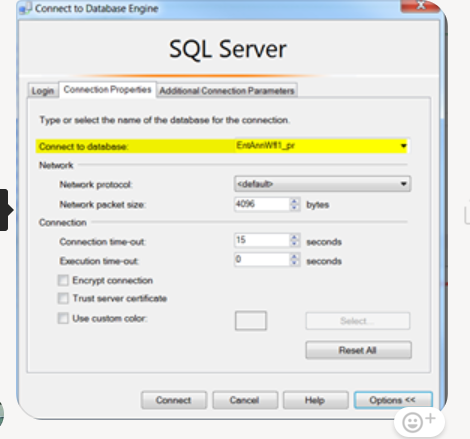
SQL Server : Linked server related error while running select against view

Error :-

Msg 7202, Level 11, State 2, Procedure distrib_comb_v, Line 3 [Batch Start Line 0]
Could not find server 'AGN_SQ1_PL_TEST_PR_RW' in sys.servers. Verify that the correct server name was specified. If necessary, execute the stored procedure sp_addlinkedserver to add the server to sys.servers.
Msg 4413, Level 16, State 1, Line 348
Could not use view or function 'Test.dbo.emp_v' because of binding errors.

Solution:

Error is not related to view definition and sp_refreshview will not help here.

If we are using database based linked server, we need to manually choose default DB in option tab of SSMS and it will work fine.


Thanks
Chhavi

Wednesday, 20 February 2019

SQL Server : To find data and log file size of all DBs

Query to find data and log file size of all DBs
================

SELECT
    DB_NAME(db.database_id) DatabaseName,
    (CAST(mfrows.RowSize AS FLOAT)*8)/1024 RowSizeMB,
    (CAST(mflog.LogSize AS FLOAT)*8)/1024 LogSizeMB,
    (CAST(mfstream.StreamSize AS FLOAT)*8)/1024 StreamSizeMB,
    (CAST(mftext.TextIndexSize AS FLOAT)*8)/1024 TextIndexSizeMB
FROM sys.databases db
    LEFT JOIN (SELECT database_id, SUM(size) RowSize FROM sys.master_files WHERE type = 0 GROUP BY database_id, type) mfrows ON mfrows.database_id = db.database_id
    LEFT JOIN (SELECT database_id, SUM(size) LogSize FROM sys.master_files WHERE type = 1 GROUP BY database_id, type) mflog ON mflog.database_id = db.database_id
    LEFT JOIN (SELECT database_id, SUM(size) StreamSize FROM sys.master_files WHERE type = 2 GROUP BY database_id, type) mfstream ON mfstream.database_id = db.database_id
    LEFT JOIN (SELECT database_id, SUM(size) TextIndexSize FROM sys.master_files WHERE type = 4 GROUP BY database_id, type) mftext ON mftext.database_id = db.database_id

SQL Server : Backup path, size

Query to check Backup path, size , time etc..

SELECT          physical_device_name,
                backup_start_date,
                backup_finish_date,
                backup_size/1024.0 AS BackupSizeKB
FROM msdb.dbo.backupset b
JOIN msdb.dbo.backupmediafamily m ON b.media_set_id = m.media_set_id
WHERE database_name = 'db_name'
ORDER BY backup_finish_date DESC


SQL Server :: Clearing the plan cache for specific proc

It is very common to deal with situation where you have hundreds of procs in your database and you suspect  query plan is corrupted for one specific proc.

Following mentioned script will return plan handles and second script will help removing them one by one.

Please change database context accordingly.

**********************************************

1st, script to find all plan handles for one proc 

SELECT distinct cp.plan_handle
FROM sys.dm_exec_cached_plans AS cp 
CROSS APPLY sys.dm_exec_sql_text(plan_handle) AS st
WHERE [text] LIKE N'%proc_name%';

2nd, script to clear cache just for this proc

SET NOCOUNT ON;
DECLARE @clear AS TABLE (id INT IDENTITY(1,1), p_handle VARBINARY(64))
DECLARE @minID INT = 0
DECLARE @p_handle VARBINARY(64) = NULL
DECLARE @SQL NVARCHAR(400) = '';

INSERT INTO @clear
SELECT distinct cp.plan_handle
FROM sys.dm_exec_cached_plans AS cp 
CROSS APPLY sys.dm_exec_sql_text(plan_handle) AS st
WHERE [text] LIKE N'%proc_name%';

WHILE (SELECT COUNT(*) FROM @clear) > 0
BEGIN
SELECT @minID = MIN(id) FROM @clear;
SELECT @p_handle = p_handle FROM @clear WHERE id = @minID


SET @SQL = 'DBCC FREEPROCCACHE(0x' + CONVERT(VARCHAR(MAX), @p_handle, 2) +');'
EXECUTE sp_executesql @SQL
--PRINT @SQL

DELETE FROM @clear WHERE id = @minID

END;


Tuesday, 25 September 2018

SQL Server: Install the cluster management WMI objects on Non-clustered servers


There may be need to have cluster management WMI objects on standalone server like in my case , script needs these objects in order to collect clustered server details.

If server is not a cluster node, it doesn’t have cluster management WMI objects installed. In this case, we need to manually install the WMI objects. 

This is the procedure to install the clustering WMI objects:


On Windows 2012 Hosts:

- open a Powershell command or Powershell_ise and run the following command to install the clustering Automation Server only
  (msclus.dll only, does NOT install clustering support; just this management tool):

        install-windowsfeature RSAT-Clustering-AutomationServer

- additionally for managing via Powershell scripting, you may also want to install:

        install-windowsfeature RSAT-Clustering-PowerShell


Hope it will help

Tuesday, 24 October 2017

SQL Server :: T-SQL command that will determine / find the biggest tables in a database

It is very common to deal with situation where you have thousands of tables and want to find the biggest tables in your database. Following mentioned script will return row count, total consumed size per table so we can apply filters too to get only those table which satisfy our criteria ( for example , table which have more than 1 million rows) .

Please change database context accordingly.

**********************************************

SELECT
    t.NAME AS TableName,
    i.name as indexName,
    sum(p.rows) as RowCounts,
    sum(a.total_pages) as TotalPages,
    sum(a.used_pages) as UsedPages,
    sum(a.data_pages) as DataPages,
    (sum(a.total_pages) * 8) / 1024 as TotalSpaceMB,
    (sum(a.used_pages) * 8) / 1024 as UsedSpaceMB,
    (sum(a.data_pages) * 8) / 1024 as DataSpaceMB
FROM
    sys.tables t
INNER JOIN     
    sys.indexes i ON t.OBJECT_ID = i.object_id
INNER JOIN
    sys.partitions p ON i.object_id = p.OBJECT_ID AND i.index_id = p.index_id
INNER JOIN
    sys.allocation_units a ON p.partition_id = a.container_id
WHERE
    t.NAME NOT LIKE 'dt%' AND
    i.OBJECT_ID > 255 AND  
    i.index_id <= 1
GROUP BY
    t.NAME, i.object_id, i.index_id, i.name
ORDER BY

    (sum(a.data_pages) * 8) / 1024 desc

Hope it will help you .

Brgds,

Chhavinath Mishra
Sr. Database Administrator

Microsoft Certified IT Professional (MCITP)